













If you are looking for a multifunction device that combines innovation with reliability, the Brother MFC-J 840 N is a stellar choice. This feature-rich machine is designed to meet your printing, scanning, copying, and faxing needs, whether for home or office use. In this article, we'll explore the key features and benefits of the Brother MFC-J 840 N, and provide insights into compatible replacement toner options to keep your device running smoothly.
Key Features of the Brother MFC-J 840 N
Multifunctionality at Its Best
The Brother MFC-J 840 N sets itself apart with its four-in-one functionality, offering printing, scanning, copying, and faxing capabilities all in a single compact unit. This versatility makes it an excellent choice for both small business environments and home offices where space is at a premium but performance cannot be compromised.
Fast and Efficient Printing
One of the standout features of the MFC-J 840 N is its high-speed printing capability. With a print speed of up to 33ppm (pages per minute) for black and white prints and up to 27ppm for color, you can expect swift output without sacrificing quality. This high-speed printing ensures that your important documents are always ready when you need them.
High-Quality Output
Quality is crucial, and the Brother MFC-J 840 N delivers with a professional print resolution of up to 6000 x 1200 dpi. This ensures sharp text and vibrant images, making it suitable for a wide range of printing tasks from documents to graphics and everything in between.
User-Friendly Interface
Ease of use is paramount in any device, and the Brother MFC-J 840 N excels with its intuitive 3.3" touchscreen display. This interface makes navigation a breeze, allowing for hassle-free access to the device’s features and settings. Additionally, wireless connectivity options such as Wi-Fi Direct keep you connected without the clutter of excessive cables.
Eco-Friendly Features
In our environmentally conscious world, the MFC-J 840 N helps minimize your ecological footprint with features like automatic two-sided printing, which reduces paper usage. Moreover, the Energy Star certification assures you of the device’s efficiency and environmental friendliness.
Benefits of Using the Brother MFC-J 840 N
Enhanced Productivity
By centralizing multiple tasks into one device, the MFC-J 840 N enhances productivity and simplifies workflow. Whether you're printing lengthy reports, scanning documents, or sending faxes, you can perform all these tasks efficiently without the need for multiple machines.
Cost-Effective
The device is not only affordable but also cost-effective in the long run. It uses individual ink tank cartridges, allowing you to replace only the color you need. This reduces waste and saves money over time—an essential factor for budget-conscious users.
Replacement Toner Options
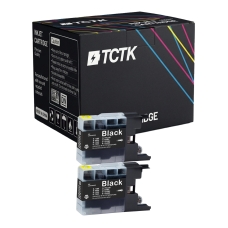
Maintaining the optimal performance of the Brother MFC-J 840 N is easy with compatible replacement toner cartridges. Techtek's range of toner cartridges ensures you achieve high-quality prints while being kind to your budget.
Compatibility and Performance
Techtek offers replacement toner cartridges that are fully compatible with the Brother MFC-J 840 N. These cartridges meet high-quality standards, ensuring that prints are consistently clear and vibrant. Moreover, they are cost-effective, allowing users to print extensively without the worry of frequent replacements.
Advantages of Choosing Compatible Toners
Opting for compatible toner cartridges from Techtek not only saves money but also supports sustainable practices by reducing waste. These cartridges provide reliable performance and longevity, making them a wise choice for users seeking both quality and economy.
Conclusion
The Brother MFC-J 840 N stands out as a top-tier choice for anyone requiring a multifunction device packed with features and impressive performance. By considering compatible replacement toners, you ensure the longevity and efficiency of your device. Embrace the power and versatility of the Brother MFC-J 840 N and enjoy seamless productivity across all your printing tasks.